


Updated November 2026
📌 TLDR: Automated corporate gifting makes client appreciation faster, smarter, and way more effective.

🔥 Skip the hassle: A gift card platform lets you send digital gifts instantly, no shipping or addresses needed.

📲 You can schedule gift card emails directly in Giftbit, for individual recipients or bulk orders, choosing a specific delivery date and time.
Automated corporate gifts can change the way companies and professionals build and maintain client relationships.
Instead of worrying about shipping delays or tracking down mailing addresses, you can simply schedule a digital gift card delivery in just a few clicks.
That means your appreciation (and your brand) shows up right on time, exactly when it matters most (bonus: no mailing address required!).
Why does this matter? Because business relationships are built on personal touches, and timing is everything.
In this article, we’ll explore how to use automated corporate gifts to make your gifting program easier, why timing and personalization matter, and what kinds of smart digital rewards you can send.
How to send automated corporate gifts
Corporate gifts, delivered in a timely fashion, are one of the easiest, most human ways to stand out, make people feel valued, and reinforce your place near the top of their already-busy minds.
But gifts that are delivered late (or never at all) because they're stuck somewhere en route or because you forgot to send them after that last project? Not so much. 😬
So how can you send great, timely gifts to clients, without breaking the bank or having to know their address? Bulk digital gift cards are the answer.
For example, with a free Giftbit account and a simple gift card integration, all it takes is a trigger, and you can send a personalized email or SMS, immediately, and with a personal note attached.
📸 Picture this: once a client signs a deal or an anniversary hits, your system automatically sends a message with a clickable, secure link to claim their gift. And ... that’s it. That's all you need to do.

Your recipient opens the link, then they can browse popular brands from the gift card catalog, and pick what they want. Happy client, no shipping drama.😎
You’ll also be able to see when gifts are opened and claimed. This real-time tracking is a serious advantage—if someone hasn’t claimed theirs, you’ll know (and can decide to send a friendly nudge).
Want to ramp up your automation? Integrate with your CRM, like Salesforce or HubSpot, and you’re off to the races.
Now, client milestones, birthdays, or contract signings become automatic touchpoints, with no manual work required.
🎁📱 How-to guide: Sending gift cards to clients

1. Create a Giftbit account. No fees to get started or use your account. No minimums. No subscriptions.
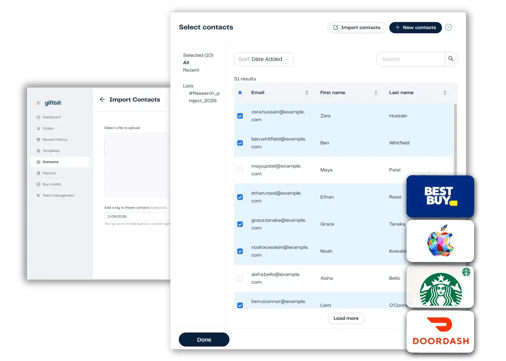
2. Upload your contacts. Use a csv.file, or manually add them. Only worry about their name and email. See how to upload here.
3. Send your gifts immediately or schedule delivery for later  🚀

Learn more about how to send gifts at scale here.
How to schedule corporate gift emails in advance
You don't need any integrations to schedule corporate gifts with Giftbit. Just create your reward template, start a new order, and select Email to Contacts. Add your recipients, check Deliver Later, and choose the date and time you want your gift cards emailed.
This is especially handy for holiday gifting for customers, upcoming events, or sending a batch of client thank-you gifts on a particular date. You can prepare everything in advance and let Giftbit handle delivery.
It's when you want gifts to go out automatically whenever something happens (i.e., whenever there's a trigger, like a client renewing their contract) that you can turn to a simple Zapier integration (detailed next).
How to automate corporate gifts without a developer
You don't need a developer to automate corporate gifting with Giftbit. Our Zapier integration lets you connect Giftbit to tools you already use, including HubSpot, Salesforce, and Google Sheets, without writing any code.
Here's how it works: First, create your gift card template in Giftbit. Then, in Zapier, choose the event in your CRM or other app that should trigger a gift, and select Giftbit's Send Rewards action. Connect the recipient's email address to the right contact field, select your reward template, and you're ready to test the workflow.

Once it's set up and running, qualifying events can trigger gift card deliveries without anyone having to send them manually.
For example, you could set up a workflow that automatically sends a $25 gift card whenever a client renews their contract. Just choose the event that triggers the gift, decide who should receive it, and set up your reward. Once it's running, Zapier handles the sending for you.
Need something more customized? Check out our gift card API for developer-built integrations.
For example: Automatically send a thank-you gift card when a client renews their account
Suppose your customer success team wants to send a $25 digital gift to the main contact at each eligible U.S. client company after its annual renewal.
In that case, a CRM and Zapier workflow could work like this:
- Record the renewal. Your CRM is updated to show that the contract has renewed.
- Check who should receive the gift. Configure the workflow to identify the right contact and check whether a gift has already been sent for that renewal.
- Send the thank-you. Giftbit emails the reward using a template you’ve prepared, with a message thanking the client for another year.
- Review what happened. Your team checks delivery and claim status.
Before turning the workflow on, test it with an internal contact and check that the recipient, amount, message, and reward options are correct. Make sure the sending account has sufficient funds, too.

👀 Our gift card integration guide walks through setting up a Zapier connection.
| What you want to do | Approach | What to prepare |
|---|---|---|
| Send gifts to a known list on a particular date | Schedule an order in the Giftbit web app | Your recipient list, reward selection, message, and sending date |
| Send a gift when a client reaches a milestone in your CRM | Connect your CRM to Giftbit through Zapier | The triggering event, recipient details, eligibility conditions, and reward template |
| Build gift sending into your own application or internal system | Use the Giftbit API | Developer support and a plan for when rewards should be created, sent, and recorded |
What are good gifts to give to clients?
📌 Why digital gift cards make great client gifts:
- Set up once, reach hundreds—even thousands—without extra effort.
- Eliminate lost packages, wrong addresses, and old spreadsheets.
- Give clients (or employees) the power to pick from a catalog of global brands.
- Track redemptions—see if there are unclaimed gift cards that might require you to nudge the recipient.
Think about the last time you got that awkward fruit basket at the office. It probably sat around until someone finally tossed it, right? And those t-shirts, pens, and other trade show giveaways you bring home just sit in the back of your drawer?
That’s just the reality with old-school, physical gifts: they’re expensive, require annoying logistics, and too often miss the mark.
Even worse, you’re on your own to check if your corporate gift actually arrived, but following up feels weird.
Here’s the game-changer: with the right gift card distributor, you can send branded, personalized gifts in as little as five minutes (no follow-up needed). 🙌
So ... you don’t have to keep a spreadsheet or check addresses—just load up your client list once, schedule the delivery, and let your automated gifting software do the heavy lifting. It’s simple, stress-free, and gets results.
Physical gifts can get lost, show up late, or (yikes) go to the wrong person.
Sales veterans know the pain: a personalized gift sent to the wrong client can be embarrassing and expensive. Digital rewards, on the other hand, can be delivered instantly, can’t be misplaced, and can even be tracked in real time.
If you’re tired of cheap swag and searching for the next clever trinket, digital gift cards mean anyone can choose something they’ll genuinely want.
That’s why digital gifts can outperform old-fashioned presents so easily—plus, they save you hours of admin time every month and let you reach clients no matter where they are.
Are you allowed to give gifts to clients?
Most professionals can give reasonable gifts, but always double-check. Gift policies and legal limits vary by region, industry, employer, and recipient, so always check the rules that apply before sending. Realtors, SaaS reps, and others may have more flexibility but should watch company and client rules, too.
Whatever industry, always keep a record for compliance—digital gifting platforms help log these details so you’re audit-ready.
When in doubt, choose a modest, universal gift card, and keep things transparent. Clients usually appreciate small, personalized tokens more than flashy gestures. It's the personal connection that matters most.
Automated gifts for employees, too
For an added bonus, the same tech that makes client gifting a breeze is also great for recognizing employees.
Omar in finance just reached five years? Sarah in sales crushed her Q2?
Automated digital rewards make it easy to celebrate all those moments—including birthdays and work anniversaries—without any guesswork.
Team Accounts let colleagues send rewards through their own accounts, with permissions managed by a team owner. Authorized team members can transfer credits and review team activity through reporting. You only have to set rules, approvals, and limits once—and after that, you’re free to focus on coaching and growing your people.
 "The right gift at the right time makes all the difference," says Sofia Baltasar, Giftbit Head of Customer Success. "Corporate rewards are all about relationship building. Send the perfect gift instantly, giving every recipient a unique and memorable experience."

Client gift automation FAQs:
Automated gifting doesn't need to be a mystery. Let’s answer what everyone asks once they see how easy this process can be.
Giftbit makes sending automated corporate gifts as easy as sending an email.
Sign up for a free account to try it out, or book some time with our team to learn more about bulk discounts or more complex workflows.


